
Last updated: 13 August 2026 · Reading time: 12 min · Author: Marc Hoffmann, Senior Visa Consultant at MyJet24 · Reviewed by: Joshua White
TL;DR — Key facts
- The barcode holds more than the print. It carries your name, flight, seat — and your six-character record locator (PNR), whether or not that code is printed on the face of the pass.
- The record locator is the sensitive part. On most airlines, that code plus your surname is the entire login to "Manage Booking".
- Blurring the text does not help. If the barcode is still readable in your photo, the data is still there.
- Free apps decode it instantly — the format is a published industry standard (IATA BCBP), not a secret code.
- Real limits exist: the barcode holds no passport number, no card details and no home address — but the booking it opens may reveal more.
- Two rules cover most of the risk: never post the pass, and shred the stub instead of binning it.
A boarding pass barcode is a compact text string that encodes your booking details: passenger name, flight number, route, date, seat, check-in sequence and — most importantly — the record locator (PNR) that identifies your reservation. Anyone who photographs the barcode can decode it in seconds with a free app, and on most airlines that locator plus your surname is enough to open your booking.
See exactly what a record locator exposes — in your browser, nothing uploaded.
In this guide
- What the barcode actually is
- Every field it encodes, decoded
- Printed vs encoded: the gap that catches people
- Why the record locator is the risky part
- What someone can — and can't — do with it
- SSSS and other codes on the pass
- Mobile passes, wallet passes and screenshots
- How to protect yourself
- What to do if yours is already public
- What governments get anyway
What the barcode actually is
The barcode on a boarding pass is a plain-text data string wrapped in a machine-readable symbol — usually a PDF417 rectangle on a printed pass, or a QR-style square on a phone. It is not encryption and not a random reference number. It is a defined sequence of fields laid out in a published airline standard, so any scanner at any airport in the world can read any airline's pass.
That standard is IATA's Bar Coded Boarding Pass specification, and the openness is deliberate: a gate reader in Lisbon has to parse a pass issued in Manila. The practical consequence is the part travellers miss — because the format is public, decoding a boarding pass barcode takes no skill and no special equipment. A free phone app reads it the same way the gate scanner does.
The barcode is not a lock. It is a label written in a language every airport speaks — and so does any phone.
Key takeaway: the barcode stores readable text in an open industry format. Treat it as public the moment anyone can see it.
Every field it encodes, decoded
A decoded boarding pass barcode is a single line of characters holding a fixed set of booking fields. Read left to right, it typically gives the passenger name, the record locator, the origin and destination airports, the airline code, the flight number, the date as a day-of-year number, the cabin class, the seat and the check-in sequence number.
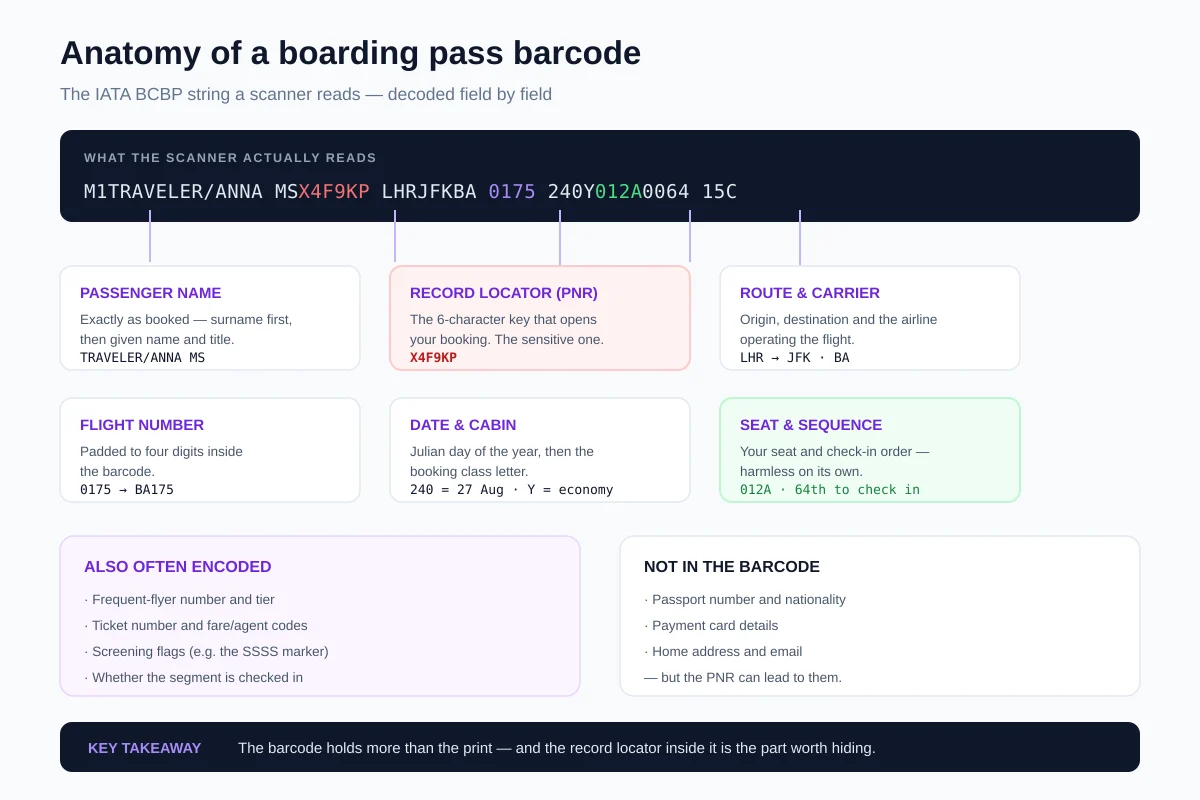
Beyond that core, airlines commonly add optional fields: your frequent-flyer number and tier, the ticket number, fare or agent codes, a marker showing whether the segment is checked in, and screening flags. Two quirks confuse people when they first decode a pass. The date is a Julian day — "240" means the 240th day of the year, not a month. And the flight number is zero-padded, so "0175" is flight 175. Neither is obfuscation; both are just compact formatting. If you want to see the same fields laid out from a booking rather than a barcode, our guide to how long a reservation stays valid and when its PNR expires walks through a live record.
Printed vs encoded: the gap that catches people
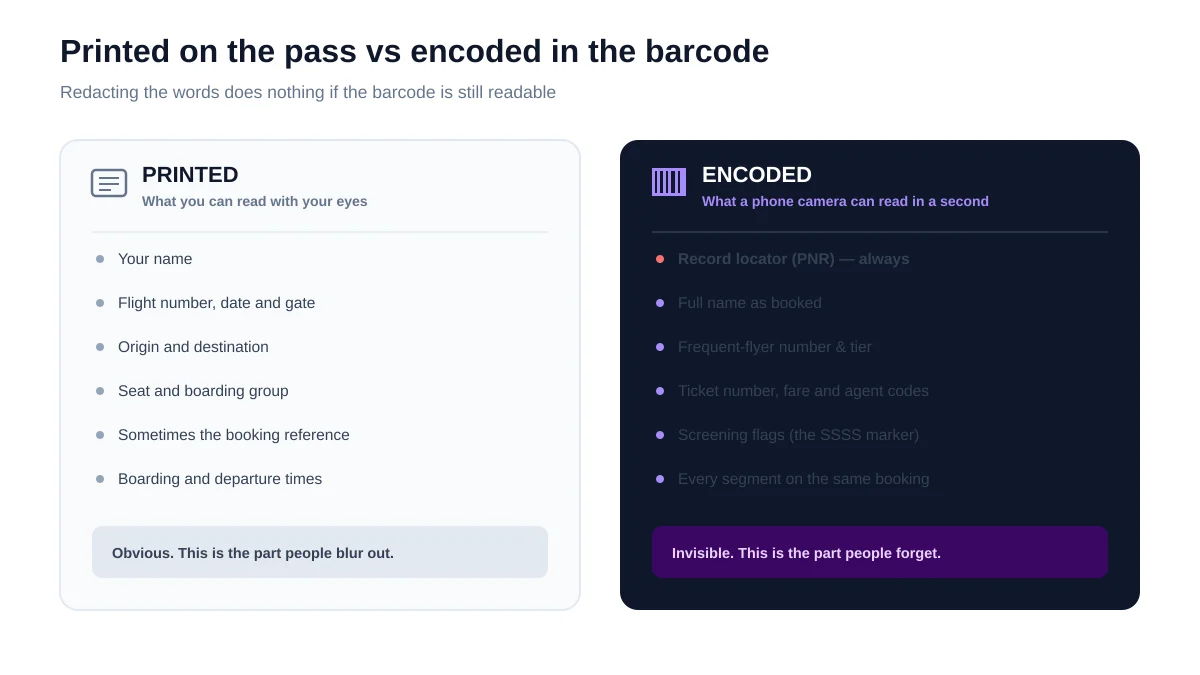
What is printed on a boarding pass and what is encoded in its barcode are two different sets, and the encoded set is larger. The print is designed for you and the gate agent: name, flight, gate, seat, boarding time. The barcode is designed for machines, so it carries the booking's identifiers as well — including the record locator, which many airlines do not print prominently, or at all.
| Data | Printed? | In the barcode? |
|---|---|---|
| Name, flight, seat | Yes | Yes |
| Record locator (PNR) | Sometimes | Always |
| Frequent-flyer number | Rarely | Often |
| Screening flag (SSSS) | Sometimes | Often |
| Passport number, card details | No | No |
Key takeaway: blurring the printed text is security theatre if the barcode is still sharp. The barcode is the sensitive half.
Why the record locator is the risky part
The record locator is the six-character code that retrieves your entire booking — and on most airline websites, it plus your surname is the whole authentication. There is no password and usually no second factor. That design exists so travel agents and family members can manage a trip, and it works fine until the code leaks.
This is why one field in the barcode matters more than all the others combined. Your seat number tells someone nothing useful; your locator hands them the reservation. Security researcher Brian Krebs demonstrated the problem twice — in 2015 and again in 2017 — by decoding barcodes from posted boarding passes and reaching the travellers' live bookings. If you want to understand what a locator actually unlocks, our explainer on what a PNR is and how to read it covers the record behind the code.
The numbers that matter
What someone can — and can't — do with it
Access to your booking is a privacy and disruption problem, not usually a financial one. With the locator and your surname, someone can typically view your full itinerary including future segments, see contact details on the file, change or select seats, and in many cases cancel flights outright. Some airline portals also expose or allow edits to the passport details stored for the trip.
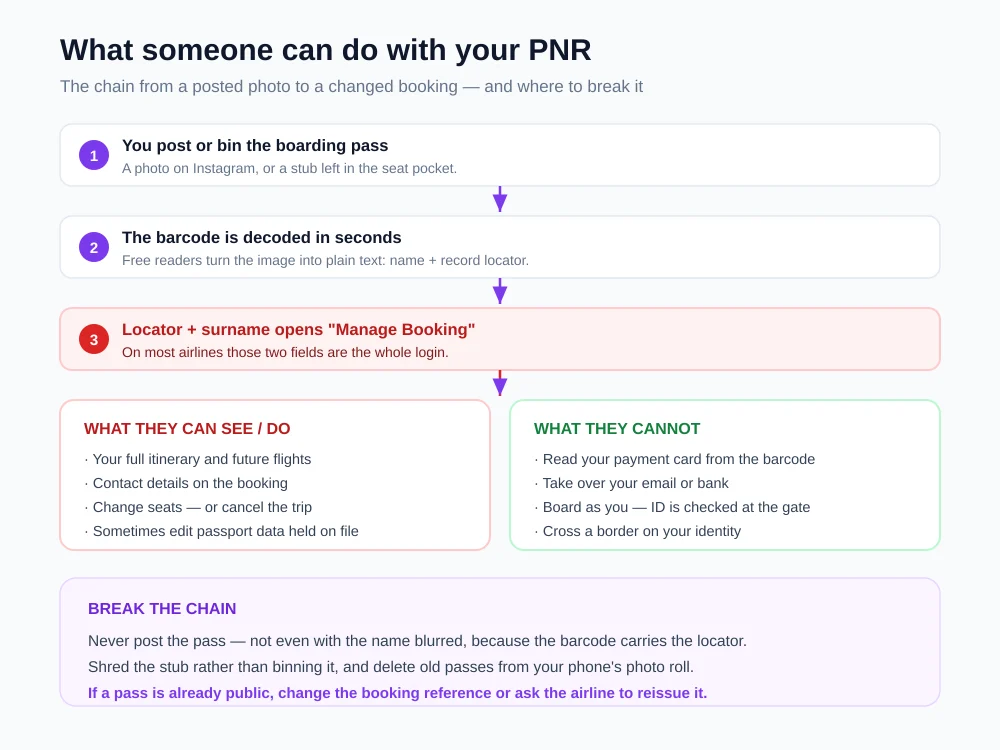
The limits are just as important, because overstated warnings help nobody. The barcode carries no payment card data, so nobody is charging your card from a photo. Nobody boards a flight as you either — identity is checked against a document at the gate and the border, a process we break down in what happens when they scan your passport. The realistic damage is a cancelled trip, a stalker-friendly itinerary, or a convincing phishing message that quotes your real flight.
Frequent flyers carry a little more exposure than everyone else, and it is worth naming. When the barcode includes a loyalty number, a leaked pass links your identity to an account holding points with real cash value and, on some carriers, stored travel preferences. Points theft is uncommon but not theoretical, and loyalty accounts are typically protected by weaker recovery flows than a bank. If you hold status, that is the one extra reason to treat the barcode as sensitive rather than decorative.
Key takeaway: the plausible harm is your itinerary and your booking, not your bank account. That is still worth protecting.
SSSS and other codes on the pass
SSSS stands for Secondary Security Screening Selection — a marker meaning you have been selected for enhanced screening before boarding. It appears on some passes and is commonly present in barcode data, and it triggers a more thorough check of you and your bags at the checkpoint. It is not an accusation, and it is frequently the result of routine or random selection, one-way tickets, last-minute bookings or unusual routings.
What most explainers miss is that screening status is a structured field, not a printed afterthought. The IATA format carries it as a coded value inside the barcode, and it is required on itineraries involving the United States — which is why the marker so often surfaces on US-bound passes specifically. So the four S's you see stamped on the paper are the visible echo of a field the scanner reads regardless.
Other codes on the face of the pass are mundane once decoded. The single letter near your cabin is the booking class — the fare bucket you purchased, not the cabin itself, which is why two people in the same economy row can hold different letters. A "SEQ" number is simply your position in the check-in queue. And the group or zone number governs nothing more than boarding order.
One more detail is worth knowing, because it explains why forgery is not the real risk here. The standard includes an optional digital signature, but it is used only where a local security authority requires it, so most boarding passes in circulation are unsigned — there is nothing cryptographic for a gate reader to verify. The system does not depend on the barcode being tamper-proof; it depends on the airline's own record and your ID at the gate. That is precisely why a leaked locator matters more than a copied barcode.
Key takeaway: SSSS is a coded screening field, not a punishment — and most passes carry no digital signature, so the barcode proves nothing on its own.
Paste a reservation into our free decoder — it runs locally in your browser.
Mobile passes, wallet passes and screenshots
A mobile boarding pass carries the same data as a paper one — the symbol just changes shape. Whether it renders as a PDF417 rectangle in an airline app or a square code in a phone wallet, the underlying string is the same standardised set of fields, including the record locator. Going paperless removes the physical stub someone can pull out of a bin; it does not shrink what the code contains.
The screenshot habit is where mobile passes get riskier than paper. A live pass in an airline app is tied to your account and disappears after the trip, but a screenshot is a permanent image sitting in your camera roll, synced to cloud backups, and one careless share away from a group chat. In our own checks, a casually framed screenshot was almost always sharp enough to decode — phone screens render the barcode at high contrast, which is exactly what a reader wants.
There is a practical middle ground. Use the airline app or wallet pass as your primary, screenshot only if you genuinely need an offline copy, and delete that image once you land. If you keep boarding passes for expense claims, crop the barcode out before filing — the printed details are enough for accounting, and the barcode is the part that carries the key. The same logic applies to any travel document with a booking reference on it, which is why we recommend verifying a reservation privately rather than sharing it around.
Key takeaway: going digital does not reduce what the code holds. Screenshots are the real exposure — they outlive the trip.
How to protect yourself
Protecting a boarding pass means protecting the barcode, not the words around it. The rules are few and they are easy, and in our own testing on posted travel photos, the barcode was legible far more often than people assume — a phone camera at arm's length is usually enough resolution to decode.
- Do not post the pass. Not on Instagram, not in a group chat, not even partly cropped — if any of the barcode is sharp, assume it is readable.
- Do not blur only the text. Cover the barcode itself, or simply photograph something else.
- Shred the stub. Seat pockets, bins and hotel wastebaskets are where paper passes are collected, which is exactly the scenario Krebs described.
- Delete old passes from your phone. Photo rolls and mobile wallets keep them long after the trip; back-ups spread them further.
- Be sceptical of "flight update" messages. A leaked itinerary makes phishing look authentic; verify in the airline app rather than through a link.
The safest habit is boring: treat the boarding pass like a house key. You would not photograph your key and post it, even from a flattering angle.
What to do if yours is already public
If a boarding pass with a readable barcode is already online, the fix is to make the exposed locator useless rather than to chase the image. Delete the post first, then contact the airline and ask whether the booking reference can be reissued or the reservation re-ticketed under a new locator. Policies differ, and some airlines will simply add a note or advise monitoring instead.
Then check the booking itself: confirm your segments are intact, that contact details have not been altered, and that no seats or extras were changed. If the trip is still ahead, watch for messages claiming schedule changes — a leaked itinerary is exactly what makes a phishing attempt convincing. For most people this ends quietly, and the residual risk is low once the trip is flown, because a locator for a completed journey opens far less.
Key takeaway: delete the image, ask about a new booking reference, then verify the reservation is unchanged. Exposure before the trip matters most.
What governments get anyway
Separate from anything on your pass, your airline already transmits your booking and identity data to the countries you fly to. Two feeds do it: Advance Passenger Information, the identity data read from your travel document at check-in, and the Passenger Name Record, the booking itself with its itinerary and contact details. In the European Union, PNR transfers are governed by Directive (EU) 2016/681, which sets a five-year retention period with masking after six months.
This matters for perspective. Keeping your barcode private protects you from opportunists — a stranger with a phone — not from the border, which receives a far richer version of the same record through official channels. We cover that pipeline in what your airline sends governments before you land. Both things are true at once: your booking is already shared with authorities, and that is no reason to hand the same code to anyone scrolling past your holiday photo.
Next steps
The short version: your boarding pass barcode is readable text in an open format, it carries your booking's record locator, and that locator plus your surname is usually the whole key to your reservation. Blurring the printed name achieves nothing while the barcode stays sharp. Do not post it, shred the stub, and clear old passes off your phone.
If you want to see concretely what sits behind a booking code — the segments, the class, the status — you can decode a reservation yourself. Our converter runs entirely in your browser, so nothing you paste is uploaded.
Sources
- Krebs on Security — What's in a Boarding Pass Barcode? A Lot (2015).
- Krebs on Security — Why It's Still a Bad Idea to Post or Trash Your Boarding Pass (2017).
- European Union — Directive (EU) 2016/681 on the use of PNR data (retention and masking rules).
This guide describes boarding pass barcodes as of 13 August 2026. The exact fields encoded vary by airline and by how each carrier implements the IATA bar-coded boarding pass standard, and airline account-recovery and booking-management policies differ. Nothing here is security or legal advice — contact your airline directly if you believe a booking has been accessed.
