
Last updated: 13 August 2026 · Reading time: 12 min · Author: Marc Hoffmann, Senior Visa Consultant at MyJet24 · Reviewed by: Joshua White
TL;DR — Key facts
- Two things happen at once: the chip is read (your identity) and that identity is checked against live databases (what the border knows about you).
- The chip holds no travel history. It stores your name, date of birth, nationality, photo and passport number — not your stamps, not your past trips.
- Your history lives in the databases, not the passport: past entries and exits, overstays, refusals, visa status, and stolen-document flags.
- Interpol's stolen-passport list is checked in real time — about 138 million records, queried more than 3.6 billion times in 2023.
- Your profile often arrives before you do. Airlines send your booking and passenger data (API/PNR) to the destination hours before landing.
- The one variable you control is your paperwork — a credible, verifiable onward trip is the most common thing that turns a second look into a wave-through.
When an immigration officer scans your passport, two things happen at once. The chip is read — your name, date of birth, nationality, photo and passport number — and that identity is checked against live databases: Interpol's stolen-document list, security watchlists, your visa status, and your entry and exit history. The chip proves who you are; the databases reveal what the border already knows about your travel.
The proof-of-onward-travel that keeps a second look from becoming a refusal.
In this guide
- What actually happens in those few seconds
- What's on the chip — and what isn't
- The databases your passport hits
- Interpol SLTD: the stolen-passport check
- Your entry and exit history: what the system remembers
- Your profile arrives before you do
- eGates vs a human officer
- Green, amber, red: how the call is made
- What you can actually control
- What officers can't see (the myths)
What actually happens in those few seconds
A passport scan is a two-part event: a chip read that confirms your identity, and a database lookup that checks that identity against what governments already hold. The officer swipes the photo page through a reader, the machine lifts the data from the printed lines and the embedded chip, and within a second or two a screen returns a result. What looks like a bored glance at a monitor is actually the visible end of several searches running at once.
The reason it feels instant is that almost none of the work happens in the passport. The document carries your identity; the systems behind the desk carry your history. That split — identity in your hand, history on the network — is the single most important thing to understand about the modern border, and it is the thing nearly every explainer gets muddled.
The scanner is not reading your life story off the page. It is reading your name, then asking five different databases what they think of that name.
Key takeaway: the chip answers "who are you?"; the databases answer "what do we know about you?" Two questions, two very different data sources.
What's on the chip — and what isn't
The chip in a biometric passport is a small contactless memory holding a fixed set of identity data — and nothing about your travels. Its contents are defined by an international standard, ICAO Document 9303, so a German reader can verify a Thai passport and vice versa. Inside are the same fields printed on the photo page: full name, date and place of birth, nationality, sex, passport number and expiry, and a digital photograph used for facial matching. Many European and UK passports also store fingerprints.
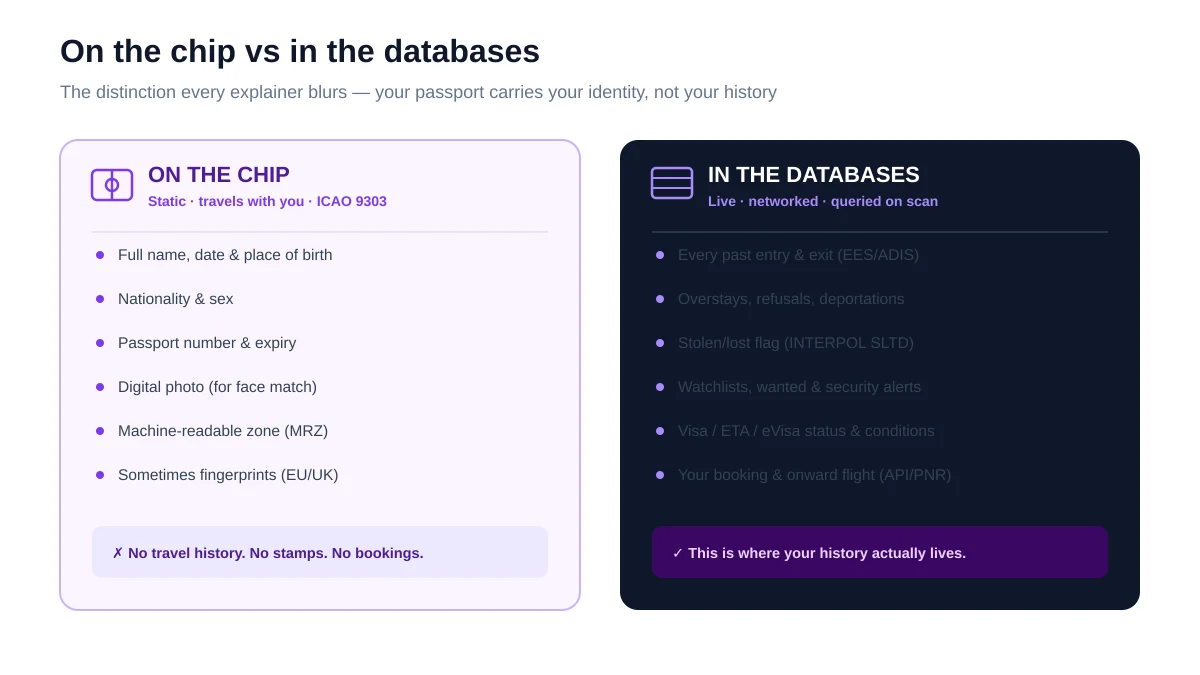
Two printed lines at the bottom of the page — the machine-readable zone (MRZ) — repeat the key fields in a format optimised for optical scanning, so the reader can lift your details even if the chip fails. What the chip does not contain is any record of where you have been: no stamps, no past trips, no visa refusals. People often assume the passport itself is a travel log. It is not. That information sits elsewhere.
| On the chip | In the databases | |
|---|---|---|
| What it is | Fixed identity data | Live history & status |
| Examples | Name, DOB, nationality, photo, MRZ | Entries/exits, overstays, watchlists, visa status, booking |
| Travel history? | None | Yes — years of it |
| New passport resets it? | New number, blank pages | No — tied to your identity |
Key takeaway: the chip is a sealed ID card, not a diary. It proves you are you — it says nothing about your history.
The databases your passport hits
The moment your identity is confirmed, the border system queries several databases in parallel to build a picture of the person standing at the desk. Each answers a different question — is this document genuine and unflagged, is this person wanted or barred, are they allowed in, and what have they done at the border before. The screen the officer reads is a summary of those answers.
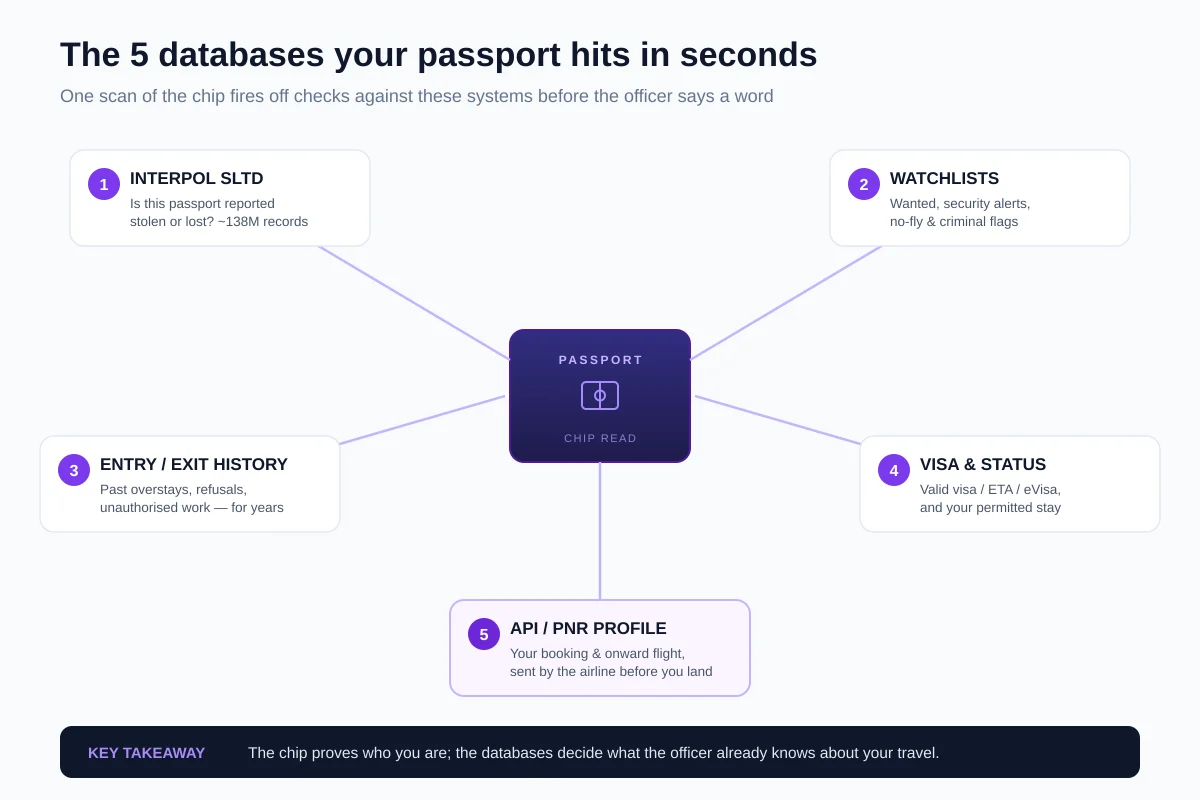
The exact systems vary by country, but the categories are consistent worldwide: a stolen-document check, security and law-enforcement watchlists, your immigration and entry/exit record, your current visa or travel-authorisation status, and the passenger profile the airline transmitted ahead of the flight. None of this is stored on your passport; all of it is retrieved by scanning it. The same principle already applies before you even reach the desk, through the airline's own document check — Timatic, the database that decides whether you board.
Interpol SLTD: the stolen-passport check
The first thing many borders check is whether the document itself is trustworthy, using Interpol's Stolen and Lost Travel Documents (SLTD) database. This is a global register of passports and ID cards reported stolen, lost or invalidated — around 138 million records contributed by countries worldwide. When your passport is scanned, its number is checked against that list in real time; a match means the document has been reported and should not be honoured.
The scale is the point. In 2023 the SLTD database was searched more than 3.6 billion times — a sign of how routine this check has become at airports and land crossings. For an ordinary traveller with a valid passport, it is invisible. For anyone travelling on a document that has been reported lost or stolen, it is the moment the trip ends, because a genuine-looking passport that appears on the list is treated as a red flag rather than valid ID.
If you ever report a passport lost and later find it, do not travel on it. The number is already on the Interpol list, and the next scanner will treat it as stolen.
Your entry and exit history: what the system remembers
Your immigration history is the database that worries travellers most, and it is more complete than the stamps in your passport suggest. Border systems keep their own record of every entry and exit tied to your identity, independent of ink stamps — including overstays, refusals of entry, removals and any unauthorised work. These records persist for years and can shape how the next officer, in the same country, reads your case.
The clearest example is Europe. The EU's Entry/Exit System (EES), fully operational from 10 April 2026, registers every non-EU traveller's crossings electronically and automatically calculates the 90-days-in-180 short-stay allowance — so an overstay is now computed by software, not estimated from stamps. The United States keeps a comparable exit record. The practical consequence: an old overstay does not vanish when you get a fresh passport, because the record is attached to you, not to the booklet. We cover the mechanics in our guide to how the EES changes your travel documentation.
Key takeaway: a new passport gives you clean pages, not a clean record. Your entry/exit history follows your identity across documents.
Your profile arrives before you do
By the time you reach the desk, the destination often already has your details, because airlines transmit passenger data ahead of the flight. Two feeds do this: Advance Passenger Information (API), the identity data read from your passport at check-in, and Passenger Name Record (PNR), the booking itself — your itinerary, contacts and, crucially, your onward or return flight. This is why an officer can ask about your return ticket before you have said a word: they can already see it.
That advance profile is what turns border control from a cold check into a pre-briefed one. We break down the two feeds in what your airline sends governments before you land, and what a booking record actually contains in what a PNR is and how to read it. The takeaway for a traveller is direct: the reservation you show at the border is also the reservation already in the system, so it needs to be a real, verifiable booking rather than a screenshot.
A genuine reservation with a live PNR — the kind that matches what the border already sees.
eGates vs a human officer
An eGate is an automated version of the same process, with a camera doing the identity step that an officer would otherwise do by eye. The gate reads your chip, then takes a live photo and compares it to the image stored on the passport — a one-to-one facial match — while the same database checks run in the background. If everything aligns, the barrier opens; if anything is unclear, the gate refers you to a human.
The difference is not what gets checked but who resolves the grey areas. A machine is good at "is this the same face" and "is this document flagged," and it hands anything ambiguous — a borderline match, a question about your purpose or funds — to an officer. The US border agency describes exactly this flow: chip read, facial comparison, and referral of anything that needs judgement to secondary inspection. So passing an eGate is not a lighter check; it is the same check, with a person kept in reserve for the hard calls.
eGates also have hard limits that send you to a desk regardless of your record. A damaged photo page or a chip that will not read, a face the camera cannot match to the stored image, and — in many countries — younger children or first-time entrants on certain visa types are all routed to an officer by design. Being pushed out of an eGate is usually a technical or eligibility issue, not a sign that something is wrong with you; the officer simply does by hand what the gate could not.
Key takeaway: eGates automate identity and screening, not judgement. Anything that needs a decision still goes to a human.
Green, amber, red: how the call is made
Every scan resolves to one of three outcomes: admit, refer, or refuse. Nothing flags and your status is clean, and you are through in seconds (green). Something needs a human judgement — your purpose, your funds, your onward plans — and you are sent for a closer look (amber). Or a hard hit appears — a stolen-document match, an entry ban, a watchlist alert — and you are refused (red).
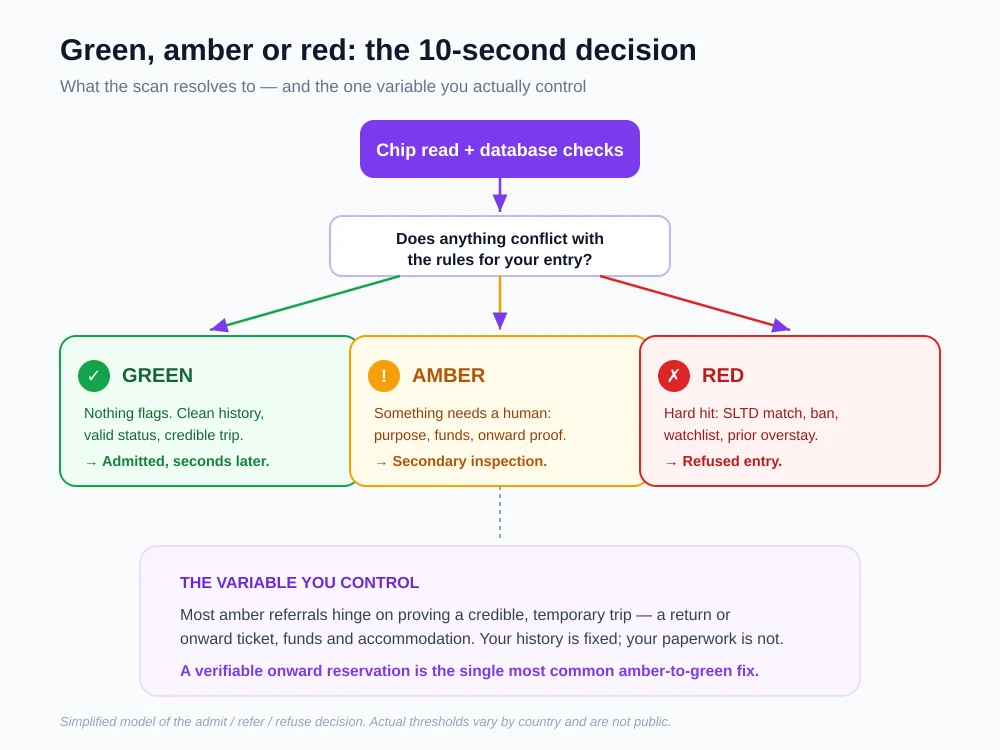
Most travellers who run into trouble land in amber, not red — a referral to secondary inspection rather than an outright refusal. Amber is where the officer asks the questions the database cannot answer on its own: is this trip what it looks like, can you support yourself, and are you going to leave. Red is reserved for the hard database hits that need no conversation. The important detail is that amber is negotiable and red usually is not, which is exactly where a traveller's own preparation matters.
What you can actually control
Almost everything the scan reveals is fixed — but the paperwork behind an amber referral is not, and that is the part worth getting right. You cannot change your entry history or unflag a document, yet the most common amber questions are about a credible, temporary trip: proof of onward travel, enough funds, and somewhere to stay. Those are answerable, and answering them cleanly is what moves a second look back to a wave-through.
In our experience helping travellers prepare, the single most frequent gap is proof of onward travel — a return or onward flight the officer can actually verify. A real reservation with a live booking reference matches the profile the airline already sent ahead; a static PDF that no system recognises does the opposite. If you are weighing your options, our guide to the six ways to show proof of onward travel lays out what holds up at the desk.
The same logic applies to the two questions that sit behind most referrals: can you support yourself, and where are you staying. Neither is something the scan resolves on its own, so both come down to what you can show — a bank statement that covers your trip, and a booking for at least the first nights. None of this is about producing more paper for its own sake; it is about matching the story your documents tell to the profile already on the officer's screen, so there is nothing left to query.
If you are sent for a closer look, here is what turns an amber referral back toward green, in order of how often it matters:
- A verifiable onward or return ticket — a real reservation with a live booking reference, matching the itinerary the airline already sent ahead.
- Proof of funds — a bank statement showing you can cover the trip you described.
- Accommodation — a confirmed booking for at least your first nights.
- A clear, consistent purpose — an answer about why you are visiting and when you leave that matches your documents.
You cannot edit what the border knows about your past. You can decide what you bring to answer the one question it always asks: are you going to leave?
What officers can't see (the myths)
Plenty of what travellers fear on the screen is not there, and it helps to separate the real checks from the imagined ones. The scan does not pull up your bank balance, your emails or your social media, and it does not read the stamps or visas of other countries out of your passport chip — because, as covered above, the chip holds no travel history at all. What one country sees is largely its own records plus the shared international flags, not a global feed of your every move.
That said, the picture is more joined-up than it used to be. Shared systems like the Interpol lists are genuinely global, and within blocs like the EU, member states increasingly see the same entry/exit data. So the honest summary is neither "they see everything" nor "they see nothing": a country sees its own history with you, the documents you carry, your current status, and the international red flags — a specific, powerful set, but not the all-seeing screen of traveller folklore.
Key takeaway: the screen is powerful but bounded. It shows your record with that country, your document's status, and shared alerts — not your finances or your life.
Next steps
You now know what a passport scan really is: a chip read that proves your identity, and a set of database checks that reveal your history, your status and the profile your airline sent ahead. The chip carries no travel history; the databases carry all of it; and the decision that follows is admit, refer, or refuse. Most trouble is a referral, and most referrals turn on whether your trip looks credible and temporary.
That last part is the piece you can prepare. The most common fix is a verifiable onward ticket that matches the booking already in the system — a real reservation, not a screenshot. You can generate one in under a minute.
Sources
- ICAO — Doc 9303, Machine Readable Travel Documents (e-passport chip & MRZ standard).
- INTERPOL — Stolen and Lost Travel Documents (SLTD) database (~138M records; searched 3.6B+ times in 2023).
- European Union — Entry/Exit System (EES) (electronic entry/exit registration; operational 10 April 2026).
This guide explains how passport scanning and border checks work as of 13 August 2026, drawing on ICAO Doc 9303, INTERPOL and EU material. The specific systems, retention periods and decision thresholds vary by country, are set by each authority, and are not fully public. Nothing here is legal advice — verify entry requirements with the official immigration authority for your destination before you travel.
