
Last updated: 5 September 2026 · Reading time: 14 min · Author: Marc Hoffmann, Senior Visa Consultant at MyJet24 · Reviewed by: James Mitchell, Travel Documentation Specialist
TL;DR — Key facts
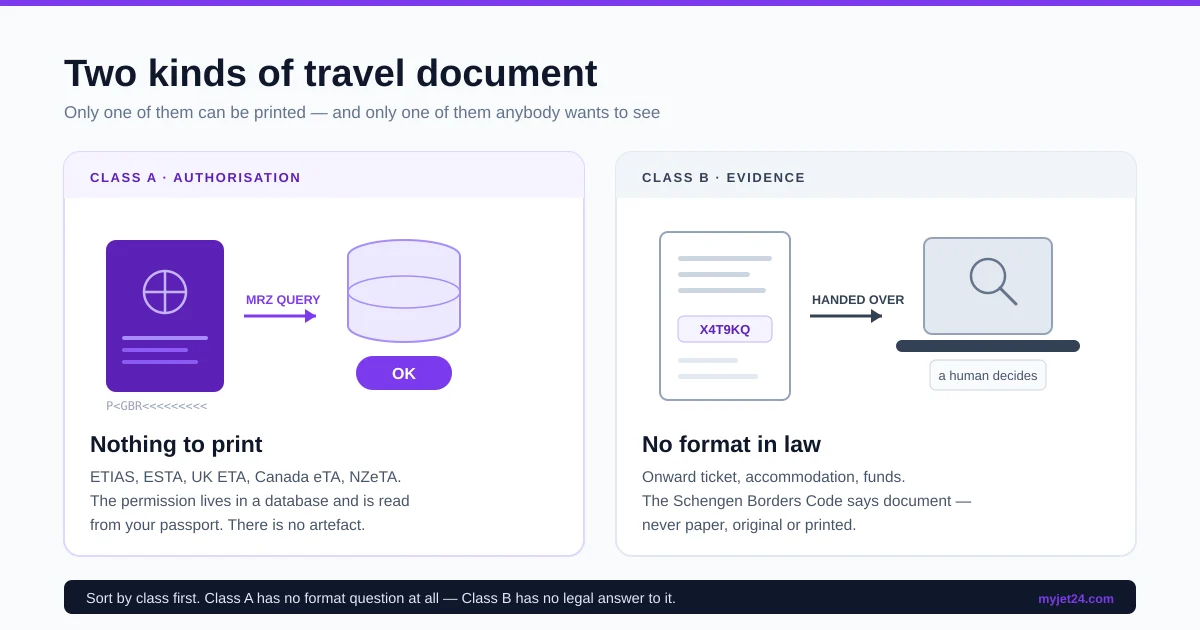
- Your travel papers split into two classes, and only one of them can be printed. An authorisation such as ETIAS, a UK ETA or an ESTA is checked by querying a database with your passport. It produces no document. Evidence such as an onward ticket or a hotel booking is handed to a human being.
- No entry law names a format. The Schengen Borders Code lists a return or round-trip ticket as documentary evidence a border guard “may request”. It says document. It never says paper, original, printed or digital.
- Because the law is silent, the checker decides. Three different people check you on one trip — a consulate officer, a check-in agent and a border officer — and each accepts a different form.
- A screenshot is the weakest format you can carry. Not because it looks unprofessional, but because it is a picture of a claim rather than a claim someone else can re-check.
- Print four things, keep the rest offline on your phone. The failure that actually strands travellers is not a rejected format. It is a dead battery in a queue with no power socket.
You do not need to print most travel documents in 2026, and some of them cannot be printed at all. Electronic authorisations like ETIAS, ESTA and the UK ETA are linked to your passport and read from a database, so there is nothing to carry. Supporting evidence — onward ticket, accommodation, funds — has no legal format, which means a phone is usually accepted and paper is never refused. Print the four documents that must survive a dead battery.
A booking reference in a PDF you can print. Free, no card required; one an agent can pull up comes with Premium ($7.90).
What does the law actually say about printing travel documents?
A travel document format requirement is a rule stating the physical or digital form in which evidence must be presented — and in European entry law, no such rule exists. The Schengen Borders Code sets out what a border guard may ask you for, and it never once specifies how it should look.
Article 6(3) of Regulation (EU) 2016/399 says that a “non-exhaustive list of supporting documents which the border guard may request from the third-country national in order to verify the fulfilment of the conditions” is set out in Annex I. Turn to Annex I and, for tourism, you find three items: a document indicating the accommodation envisaged, “confirmation of the booking of an organised trip or any other appropriate document indicating the envisaged travel plans”, and, under the heading of return, “a return or round-trip ticket”.
Read those phrases again and notice what is missing. Not paper. Not original. Not printed, stamped, certified or signed. The operative word throughout is document, and the qualifier is appropriate. The Visa Code uses identical language for consular applications: Annex II of Regulation (EC) No 810/2009 lists, under documentation allowing assessment of your intention to leave, item B(1) — “reservation of or return or round ticket”. A reservation is explicitly enough, and no form is prescribed for it.
The silence is not an oversight. Legislation written in 2009 and recast in 2016 deliberately avoided naming a medium, because the medium changes faster than the law does. What the drafters fixed was the fact to be proved. How you prove it was left to the person checking.
Key takeaway: nobody can point you to the rule that says print it, because the rule does not exist. Every “you must print this” you have ever read is a house policy, an airline procedure or a consulate instruction — all of which are real and binding, but none of which is entry law.
Why can you not print your ETIAS, ESTA or UK ETA?
An electronic travel authorisation is a permission recorded against your passport number in a government database, not a document issued to you. That is why the question of printing it has no answer: there is no artefact to print, and the confirmation email you received is a receipt, not the permission itself.
The ETIAS Regulation makes the mechanism explicit. Under Article 45(2), carriers query the system “prior to the boarding of a passenger”, supplying “the data contained in the machine-readable zone of the travel document”, and the system returns an “OK/NOT OK” answer. Under Article 47(1), border authorities “shall consult the ETIAS Central System using the data contained in the machine-readable zone of the travel document”. At neither point does anyone look at anything you are carrying beyond the passport itself.
The same architecture governs the UK ETA, which GOV.UK describes as something you check online rather than hold, and the US ESTA, which is validated against the passport at check-in. If you change passports, the authorisation does not travel with you, because it was never attached to you — it was attached to the document number. Our guide to how visa-free, ETA, e-visa and visa-on-arrival differ maps which destination uses which model.
Key takeaway: printing your ETIAS approval email harms nothing and helps nothing. If the database says NOT OK, a printout of an earlier OK will not change the answer at the gate.
Which of your documents belong to which class?
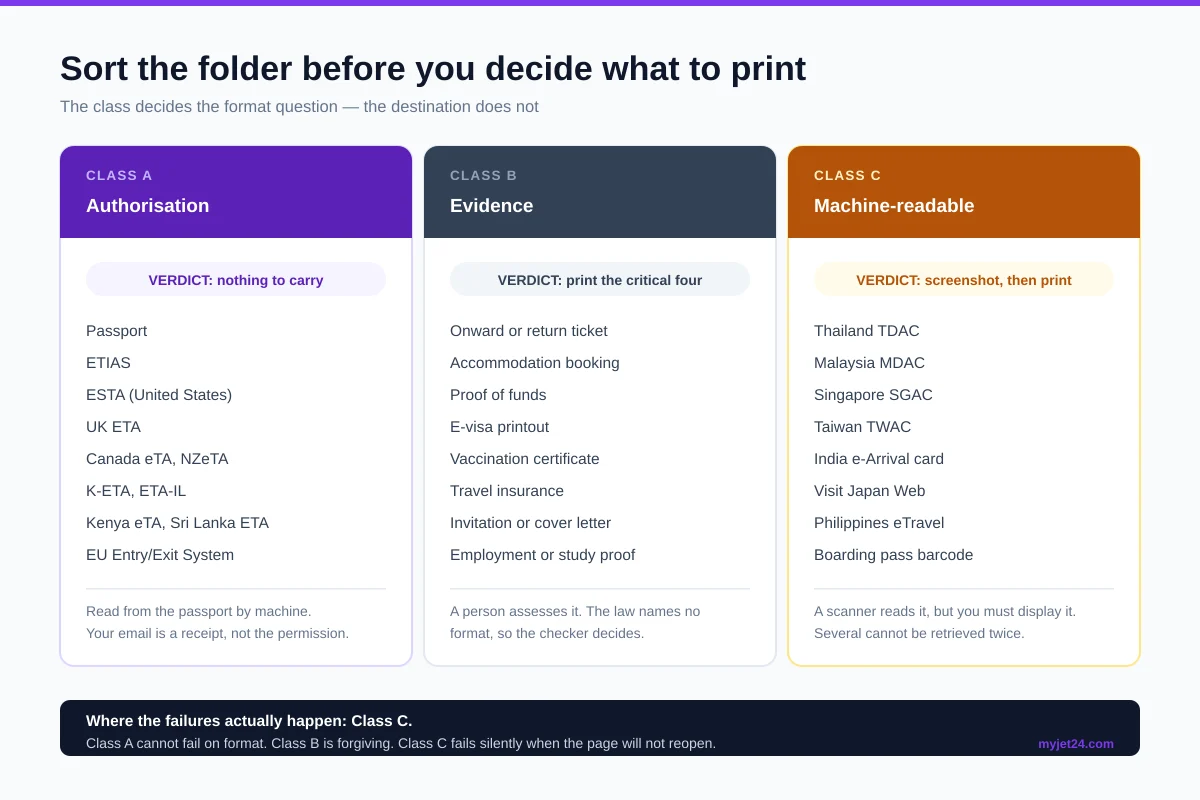
Every paper and file in your travel folder falls into one of two classes, and the class decides the format question before the destination does. Class A is authorisation: permission verified by machine against your passport, with nothing for you to show. Class B is evidence: facts you assert and a human being assesses, in whatever form you hand over.
Sorting your folder this way answers the printing question in one pass. Everything in Class A needs no format decision at all. Everything in Class B needs one, and the answer is driven by who will be looking at it, not by what it is.
| Document | Class | Format verdict | Why |
|---|---|---|---|
| Passport | A | Physical only | The chip and the machine-readable zone are the check. A photo of it is not the document. |
| ETIAS, ESTA, UK ETA, eTA, NZeTA, K-ETA | A | Nothing to carry | Queried against the passport number. Your email is a receipt. |
| Visa sticker or e-visa | A / B | Print the e-visa | A sticker is in the passport. An e-visa is often checked visually by the airline, so carry it. |
| Onward or return ticket | B | Print, and keep the reference | Annex I names it. The reference matters more than the paper, because it can be re-checked. |
| Accommodation booking | B | Phone is fine, print for visas | Rarely demanded at borders; frequently demanded on paper by consulates. |
| Proof of funds | B | Bank apps need a login and a connection. Both fail in an arrivals hall. | |
| Travel insurance | B | Phone is fine | Needed at the consulate stage far more often than at the border. |
| Digital arrival card confirmation | C | Screenshot the QR, then print it | A machine reads it, but you have to display it. Both failure modes are yours. |
| Boarding pass | C | Phone, with a paper fallback | Scanners read the barcode either way. Some airports still gate-check paper only. |
| Vaccination certificate | B | Health desks are the least digitised checkpoint on the route. |
Class C, which the table introduces quietly, is the awkward middle: a machine reads it, but you are responsible for putting it in front of the machine. That is where most real-world failures happen, and section eight deals with it in full.
Key takeaway: ask what class a document is before you ask whether to print it. Class A has no format. Class B has no legal format. Only Class C has a technical one.
By the numbers
- 13 authorisation systems, zero printable documents. Across the electronic authorisations we have documented on this blog — ETIAS, ESTA, UK ETA, Canada eTA, NZeTA, K-ETA, ETA-IL, Kenya eTA, Sri Lanka ETA, Saudi eVisa, Venezuela e-visa, the GCC unified visa and the EU Entry/Exit System — not one produces a document that anyone at a border needs to see.
- 13 arrival declarations, most ending in something you must display. Thailand, Malaysia, Singapore, Taiwan, India, Vietnam, Australia, South Africa, the Philippines, Indonesia, Cambodia, Japan and Mexico each run a digital arrival form, and most close with a QR code or reference you may be asked to show.
- 132,600 refusals of entry at EU external borders in 2025, of which 40,185 — 30.3% were recorded as “purpose and conditions of stay not justified”, the category that Annex I evidence exists to answer (Eurostat).
- One legal phrase does the work. Annex I qualifies its list with “any other appropriate document” three separate times.
Method: the two counts above were produced by classifying every entry system covered in our own published guides, then checking each against its official portal for whether it issues a displayable artefact. Refusal figures are Eurostat's published 2025 series.
Who checks your documents, and what does each one accept?
Three separate parties inspect a single trip, and they are not applying the same rule. The consulate assesses an application file, the airline protects itself against a fine, and the border officer decides an entry. Their formats differ because their jobs differ.
The consulate wants a fixed, filed, reviewable record. Applications are read, annotated and archived, often by more than one person, sometimes weeks apart. That is why paper or a stable PDF is standard here and why a phone is usually not offered as an option at all: many appointment centres take physical folders, and our walkthrough of booking a VFS Global appointment covers what actually happens at the counter. If a consulate publishes a document list, follow it literally — that instruction outranks everything in this article.
The check-in agent wants a yes or no in under a minute. They are working from an eligibility system, described in our guide to the Timatic database that decides if you board, and their exposure is a fine plus the cost of flying you home if the destination rejects you. They will look at a phone screen without complaint. What they will not do is wait while you find a signal.
The border officer has already read the machine's answer before speaking to you. Your passport was scanned, the authorisation databases were queried, and the conversation that follows is about the parts no database holds — purpose, funds, where you are staying, when you leave. Our breakdown of what happens when they scan your passport covers the automated half, and the questions officers actually ask covers the human half.
One trip, three checkers, three different definitions of enough. The consulate wants a record it can file. The airline wants a decision it can defend. The officer wants an answer it can act on. A format that satisfies all three is paper you also hold digitally.
Key takeaway: there is no single correct format because there is no single checker. Optimise for the strictest of the three you will meet, which is almost always the consulate.
When is a screenshot not good enough?
A screenshot is an image of what a screen displayed at one moment, which makes it the only travel format that cannot be re-checked by the person receiving it. That single property, not its appearance, is why consulates treat screenshots with suspicion.
Compare two ways of showing the same onward flight. A screenshot of a booking page asserts that a flight exists. A booking reference asserts the same thing and hands the reader a way to confirm it independently, by typing six characters into an airline site. The first is testimony. The second is testimony plus a method of verification, and the difference costs you nothing to provide.
This also explains why screenshots fail asymmetrically. A check-in agent will glance at a screenshot of a hotel confirmation and move on, because they are not adjudicating anything. A visa officer comparing your file against your application form will not, because their entire task is corroboration, and a screenshot corroborates nothing that was not already on the page it copied. If you want the reference to hold up, our guide to verifying a PNR before you submit it shows how to check it the same way an officer would, and what a PNR actually is explains what the reference points to.
There is one honourable exception. A screenshot taken of a document you already hold in a verifiable form — the QR of an arrival card, a boarding pass barcode — is a legitimate offline backup, because the machine reading it does not care where the pixels came from. The screenshot is not the evidence there; it is a carrier for it.
Key takeaway: screenshot a machine-readable code freely. Never let a screenshot be the only evidence of a human-assessed fact.
Carrying a screenshot because you have nothing better?
Create a verifiable flight reservation ($7.90)A real booking reference via MyJet24 Premium in a printable PDF, so the same document works at all three checkpoints.
Where do phones actually fail at a border?
Phone failures at borders are almost never about the format being rejected. They are about the document being unreachable at the moment it is asked for, and there are four distinct ways that happens.
One: the battery. Long-haul arrival, no socket in the immigration queue, and a phone that has been navigating and streaming since departure. This is the single most common failure and the one travellers plan for least.
Two: no data. Roaming is off by default on most plans, a local SIM has not been bought yet, and airside connectivity ends where the arrivals hall begins. Any document stored only in the cloud is gone.
Three: the captive portal. Airport wifi that requires a room number, a local phone number for an SMS code, or an email confirmation you cannot receive without the wifi you are trying to join. This one is quietly vicious because the phone shows a connection while nothing loads.
Four: the app. Airline and banking apps that log you out on a new network, require two-factor authentication by SMS to a number that is roaming, or refuse to open the booking without a server round trip. A booking that lives inside an app is not a document you have. It is a document you can usually retrieve.
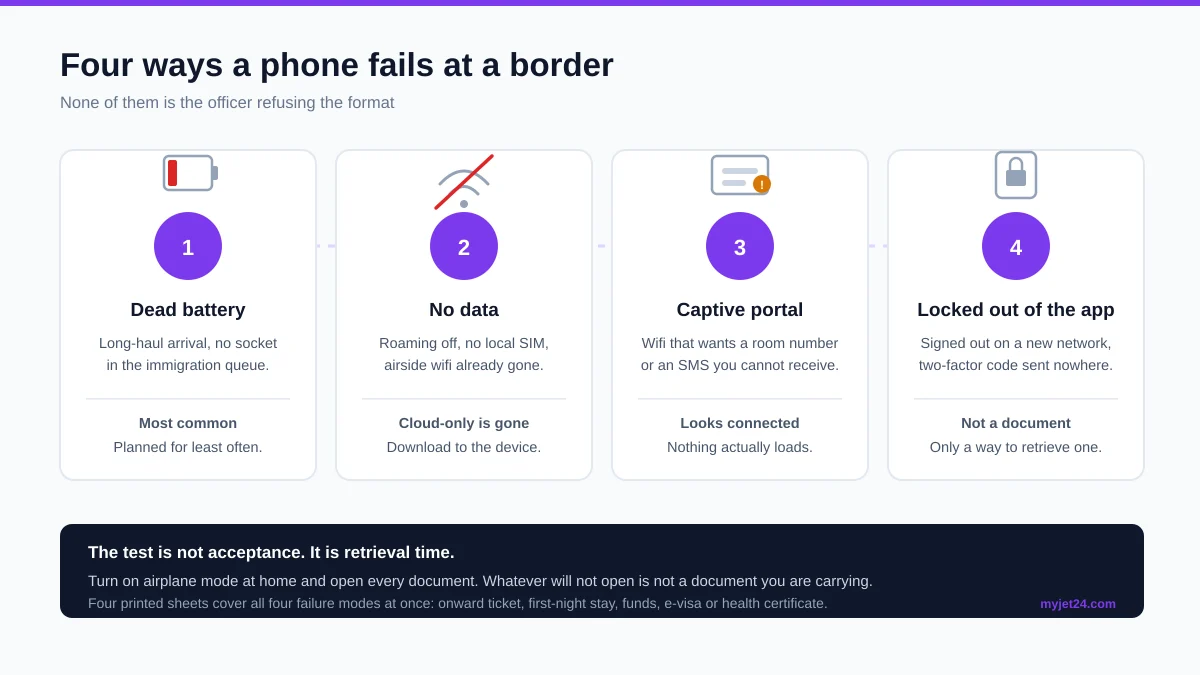
Key takeaway: the question is not whether the officer accepts a phone. It is whether the phone can produce the document within the fifteen seconds you have.
How do you build a document pack that survives a dead phone?
A document pack is a deliberate set of copies arranged so that no single failure removes your ability to prove anything. The rule we use with travellers is three copies, two formats, one that works with a dead phone.
- Sort your folder into the two classes first. Anything in Class A comes off the list immediately. You will usually find you were planning to print two or three things that nobody can look at.
- Download every Class B and Class C document as a PDF onto the device itself. Not into a cloud folder that syncs on demand — onto local storage, opened once offline to confirm it opens. Turn airplane mode on and test it before you leave home.
- Print the four that must survive a dead battery. Onward or return ticket, accommodation for the first night, proof of funds, and any e-visa or vaccination certificate. Four sheets, one plastic wallet, in your hand luggage rather than your checked bag.
- Screenshot the machine-readable codes. Arrival card QR, boarding pass barcode. These belong in your camera roll, which opens offline in under a second, not in an app that needs a session.
- Write the references on the printed sheets. Booking reference, ticket number, policy number, hotel confirmation code. If the phone dies and the paper is queried, the reference is the thing that lets someone else confirm it.
- Email the whole pack to yourself with a subject line you can search in three words. This is the recovery layer, not the primary one. It only works when the other three have failed and you have found a connection.
In practice, travellers who follow this arrive with a thin wallet rather than a folder. Four printed sheets is the number that keeps recurring, because it is exactly the set of facts a border officer can ask about that no database already holds.
Key takeaway: print by failure mode, not by document type. Print what you cannot afford to be unable to produce with a flat phone.
What about the QR codes from digital arrival cards?
A digital arrival card confirmation is Class C: a machine reads it, but you are responsible for putting it in front of the machine. Thailand's TDAC, Malaysia's MDAC, Singapore's SGAC, Taiwan's TWAC, India's e-Arrival card and Japan's Visit Japan Web all end the same way — with a code or reference that exists on a page you must be able to reopen.
The recurring problem is that several of these systems do not let you retrieve the code once you have closed the page. India's e-Arrival card is the sharpest example: the QR is generated at the end of the filing and is not restorable afterwards. That converts a routine form into a single point of failure, and a screenshot is the correct answer.
Our regional overview of Asia's digital arrival cards lists the filing windows system by system, and the Visit Japan Web guide covers the one that most often catches travellers out at the gate rather than the border.
Key takeaway: screenshot every arrival-card QR the moment it appears, then print it too. It is the one category where redundancy costs nothing and the failure is unrecoverable.
Why do airlines ask for paper the destination never required?
An airline asks for documents it is not legally obliged to see because the airline, not the destination, pays when you are refused entry. That asymmetry produces a check that is stricter than the rule it enforces.
If you arrive without something the destination required, the carrier that brought you is fined and made to fly you back. So the agent at the counter is not asking “does the law require this?” but “can I defend this decision afterwards?”. A document they can see resolves that question faster than an argument about what Annex I actually says, and the queue behind you makes speed a factor. Our piece on the difference between a dummy ticket, an onward ticket and a flight reservation explains why the label on the document changes the reception it gets.
The practical consequence is that the counter is where paper still earns its keep. Not because it is required, but because it removes a conversation. Handing over a printed reservation with a visible booking reference ends the check; opening an app while the agent waits extends it, and an extended check is where a blocked check-in turns into a missed flight.
Key takeaway: paper at the airline counter is a speed decision, not a compliance one. It costs four sheets and buys you an uncontested check.
What happens if you hand an officer your phone?
Handing over an unlocked phone hands over more than the document on screen. In most arrivals halls nothing further happens — the officer looks at the booking and gives it straight back — but the exposure is real and it is avoidable at zero cost.
The practical mitigation is not refusal, which escalates a routine check into an incident. It is preparation. Open the document before you reach the desk, put the phone in airplane mode so notifications do not surface on a screen someone else is holding, and where your device supports it, use guided or pinned access so the screen cannot be navigated away from. A phone showing one PDF is a document. A phone showing your home screen is a filing cabinet.
This is also an argument for paper that has nothing to do with acceptance. A printed sheet answers the question and reveals exactly what is on it, which is why travellers who have been through a secondary inspection at a border tend to arrive with paper the next time.
Key takeaway: if you plan to show a document on a phone, decide in the queue which document and open it there. Never hand over a device you have not prepared.
When is printing actively the wrong move?
Printing becomes a liability the moment the printed copy stops matching the live record. Paper freezes a fact; bookings change; and a document that disagrees with the current reality is worse than no document at all.
Three situations recur. A flight is rescheduled by the airline after you print, so your sheet shows a departure that no longer exists. You rebook accommodation and forget that the old confirmation is still in the wallet. Or you print a reservation early in a visa process, the dates move, and the printout now contradicts the form you submitted — the exact failure covered in our guide to whether your visa form and flight booking have to match.
Paper does not go out of date politely. It goes out of date silently, in a wallet, and presents itself with total confidence at the worst possible moment. Print late, and print once.
The fix is timing, not abstinence. Print the day before you travel, not the week before, and physically destroy superseded copies rather than leaving them in the same wallet. Two versions of the same booking in one folder is the mistake that produces a question you did not need to answer.
Key takeaway: a stale printout is a contradiction you are carrying voluntarily. Print last, and throw the old one away.
How much should you print in the end?
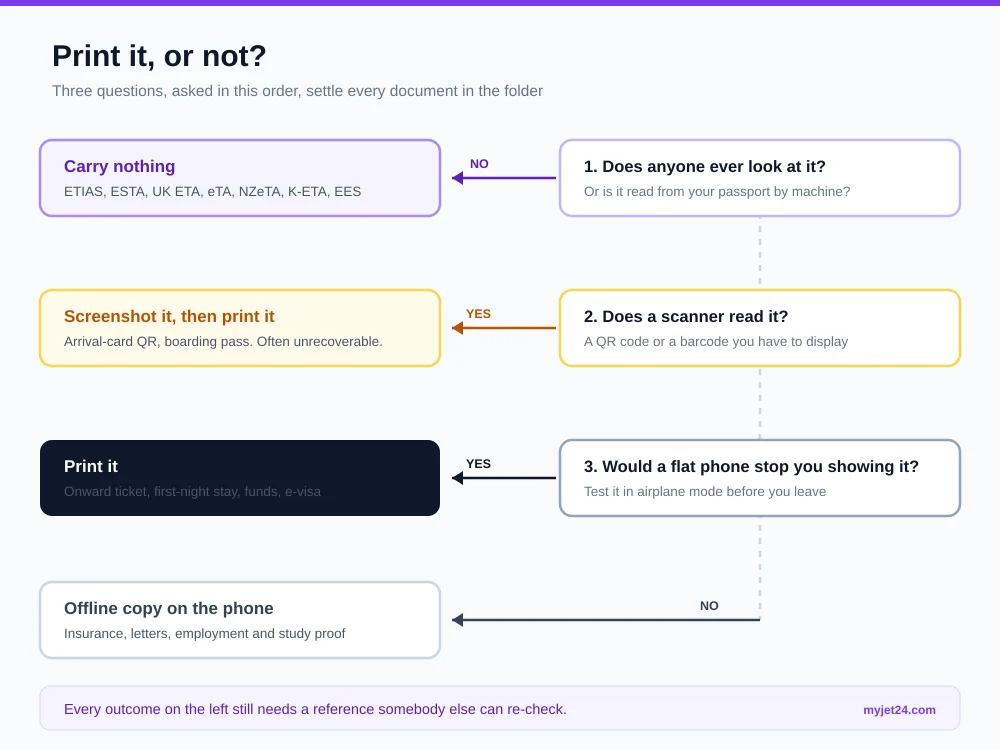
For a standard tourist trip in 2026, four printed sheets is the right answer: onward or return ticket, first-night accommodation, proof of funds, and any e-visa or health certificate. Everything else belongs on the phone, downloaded and tested offline.
That number scales with the checkpoints you face rather than the length of the trip. A visa application adds whatever the consulate's own list demands, in the form it demands. A visa-free arrival with an electronic authorisation subtracts nothing, because the authorisation was never printable to begin with. And a trip through a country with a digital arrival card adds one screenshot, not one sheet.
If you want the full document list by application type rather than by checkpoint, our visa application checklist covers what goes in the file, and the six ways to show proof of onward travel covers which kind of onward evidence to choose before you worry about what form it takes.
Key takeaway: four sheets, everything else offline on the phone, and one screenshot per QR code. That set covers all three checkpoints without carrying a folder.
Frequently asked questions
Does an embassy accept a PDF sent by email instead of a printout?
It depends entirely on how that consulate collects applications. Consulates and visa centres that run an online portal expect uploads and will not take paper; those that run in-person appointments expect a physical folder and have no mechanism to receive an email. Check the appointment confirmation rather than guessing, because submitting in the wrong channel usually means the application is not registered at all.
Can I show my e-visa on my phone at check-in?
Usually yes, but carry a printout anyway. Check-in agents verifying an e-visa are reading it visually rather than querying a database, so they need to see the document, and an e-visa is one of the few Class A items that behaves like Class B in practice. A printed copy also removes any dispute about whether the reference number was legible on a cracked screen.
What happens if my phone dies before immigration?
Nothing, if your evidence is on paper; a long wait, if it is not. Officers do not refuse entry over a flat battery, but they will move you aside until you can produce what they asked for, and charging points on the secure side of an arrivals hall are rare. This is the scenario the four printed sheets exist for.
Do I need to print my boarding pass in 2026?
Not at most airports, but the exceptions are geographic rather than logical. A handful of airports and several low-cost carriers still require a paper pass, sometimes charging a fee to print one at the airport, and a few countries require a printed pass to enter the terminal building at all. Check the airline's own conditions for the specific departure rather than assuming a global standard.
Is a photo of my passport ever accepted?
Not for crossing a border. The passport is checked by reading its machine-readable zone and, increasingly, its chip, and an image contains neither. Photos of a passport are useful for hotel check-ins, embassy replacement after a loss and internal domestic identification in some countries, but they are never a substitute at immigration.
Do I need colour printing, or is black and white fine?
Black and white is fine for every supporting document discussed here. Colour matters only where a document carries a security feature that colour reproduces — certain visa vignettes, some vaccination certificates, and consulate photo requirements. If a consulate's own list specifies colour, follow it; otherwise nobody at a border is assessing your ink.
Can I use a tablet or laptop instead of a phone?
At a consulate appointment, rarely, because most centres take a folder rather than a device. At an airline counter and a border desk, a tablet is treated exactly like a phone. The practical difference is that a laptop takes too long to wake and unlock in a queue, which is precisely the friction that turns a routine check into a longer one.
Does the officer keep the paper I hand over?
At a border, almost never — documents are inspected and returned, and only in a secondary inspection might a copy be taken for the file. At a consulate, assume everything you submit is retained and never hand over an original you cannot replace, such as a property deed or an employment contract, unless the published list demands the original specifically.
What if I cannot print anything before I fly?
Download every document to local storage, verify each one opens in airplane mode, and carry a charged power bank. That combination covers three of the four offline failure modes. Most airports also have a business centre or a print kiosk landside, so the last opportunity to print is usually after check-in rather than before leaving home.
Do I need documents for a connecting flight in a third country?
Sometimes, and it is the leg travellers forget. The carrier's eligibility check covers your whole itinerary, not just the next sector, so a transit country's rules can block boarding at the very first airport. If your connection requires leaving the secure area, you are entering that country and its evidence rules apply in full.
Next steps
The format question turns out to be a smaller question than it looks. Half your documents cannot be printed because they were never documents, and the other half have no legally prescribed form at all. What remains is a practical judgement about failure: print the things you cannot afford to lose to a flat battery, keep everything else downloaded and tested offline, and make sure every piece of evidence carries a reference somebody else can check.
That last point is the one worth acting on before you travel. A reservation with a working booking reference satisfies the consulate, the check-in agent and the border officer in the same document, printed or on screen. A screenshot satisfies none of them properly.
One document that works at all three checkpoints
A flight reservation with a real booking reference, in a PDF you can print or show offline.
Create your free flight reservationBooking reference, no card required; a verifiable PNR comes with Premium ($7.90).
Sources
- Regulation (EU) 2016/399 (Schengen Borders Code), Article 6 — entry conditions and the power to request supporting documents.
- Schengen Borders Code, Annex I — the non-exhaustive list of supporting documents, including a return or round-trip ticket.
- Regulation (EC) No 810/2009 (Visa Code), Annex II — item B(1), “reservation of or return or round ticket”.
- Regulation (EU) 2018/1240 (ETIAS), Article 45 — carrier verification by machine-readable zone, returning an OK/NOT OK answer.
- UK Home Office, Get an electronic travel authorisation to visit the UK — ETA overview and online status check.
- Eurostat, refusals of entry at EU external borders, 2025 — 132,600 refusals; 40,185 for purpose and conditions of stay not justified.
About the author
Marc Hoffmann is the founder of MyJet24 and a Senior Visa Consultant. He has guided more than 50,000 travellers through visa documentation across 195+ countries since 2021, and writes from primary legislation and published decision-maker guidance rather than second-hand summaries.
Reviewed by James Mitchell, Travel Documentation Specialist at MyJet24, who checks every legal citation against the official text before publication.
Last reviewed: 5 September 2026 by James Mitchell. Methodology: every provision quoted here was retrieved from the official consolidated text and checked verbatim. The two document-class counts were produced by classifying each entry system covered in our own published guides against its official portal.
This guide is general information about documentation practice, not legal advice on an individual application. Where a consulate publishes its own document list, that list governs.
