
Last updated: 12 August 2026 · Reading time: 12 min · Author: Marc Hoffmann, Senior Visa Consultant at MyJet24 · Reviewed by: Joshua White
TL;DR — Key facts
- A PNR is your booking file. Passenger Name Record: name, itinerary, contact, payment, and a six-character record locator that pulls it up.
- The record locator is not the PNR. It is the retrieval key — the short code you quote — while the PNR is everything stored inside.
- A record locator alone proves a reservation, not a paid ticket. A 13-digit e-ticket number is what confirms the booking was actually ticketed.
- The locator's format hints at the system that issued it — Amadeus, Sabre, Travelport (Galileo/Apollo) or Worldspan each shape it differently.
- A real PNR is verifiable. If the airline's "Manage Booking" page finds it with your locator and surname, it is live. A PDF that no system recognises is not.
- Your PNR is retained and shared. Under the EU PNR Directive it is kept for five years and masked after six months; carriers also transmit passenger data to border authorities before departure.
A PNR (Passenger Name Record) is the digital file an airline or reservation system creates for your booking. It holds your name, full itinerary, contact and payment details, and a six-character record locator used to retrieve it. The record locator is the short code you quote to find the booking; the PNR is everything inside it. One booking, one record, one retrieval key.
Paste a booking or GDS block into our PNR converter and read every field in plain English.
In this guide
- What a PNR actually is
- PNR vs record locator vs booking reference vs ticket number
- Anatomy of a PNR: every field decoded
- How to read a segment line
- Which GDS issued your locator
- Where to find your PNR
- Booked vs ticketed: the difference that matters
- How to verify a PNR is real and live
- What your PNR reveals — and who sees it
- PNRs and proof of onward travel
What a PNR actually is
A Passenger Name Record is a single database entry that represents one journey for one set of travellers. It was invented so an airline could store everything about a trip in one place and hand it between departments — reservations, ticketing, check-in, the gate — without re-keying your details at every step. When you book a flight, the system opens a record, drops your information into defined fields, and stamps it with a short code so anyone with that code and your name can pull the whole file back up.
The concept predates the internet. Airlines standardised it through IATA so that a booking made in one system could be read in another, and the minimum set of data every PNR must contain is defined by IATA Resolution 830a — names, the itinerary, the ticketing details and the contact who made the booking. That standardisation is why a booking made through a travel agent, an airline website and an online travel agency all produce a record that looks broadly the same.
A PNR is not your ticket and it is not your boarding pass. It is the file both of those are generated from — the source record that says who is travelling, on what, and whether it has been paid for.
Key takeaway: the PNR is the whole booking file; the record locator is only the key that opens it.
PNR vs record locator vs booking reference vs ticket number
Four terms get used interchangeably and they are not the same thing. A record locator is the six-character code that retrieves a PNR; a booking reference is what airlines and agents usually call that same locator when they show it to you; a PNR is the record itself; and an e-ticket number is a separate 13-digit number that proves the booking was ticketed and paid. Confusing them is the single most common reason travellers think a reservation is "confirmed" when it is only held.
Here is the plain-English disambiguation that no single competing glossary page lays out in one place:
| Term | What it is | Looks like | Proves |
|---|---|---|---|
| PNR | The full booking record | A file of fields, not a code | That a reservation exists |
| Record locator | The key that retrieves the PNR | X4F9KP (6 chars) | Where to find the booking |
| Booking reference | The airline's name for the locator shown to you | Same 6 chars, relabelled | The same thing as a locator |
| E-ticket number | Proof the booking was ticketed | 13 digits, e.g. 176-2149006721 | That it was actually paid |
Key takeaway: "record locator" and "booking reference" are two names for the same six characters. The e-ticket number is the one that tells you money changed hands.
Anatomy of a PNR: every field decoded
The anatomy of a PNR is a small set of mandatory fields plus optional extras the airline bolts on. Strip it back and every record contains the same core: a record locator, one or more passenger names, one or more flight segments, a ticketing element, and a contact. Everything else — seat, meal, frequent-flyer number, baggage — hangs off that skeleton.
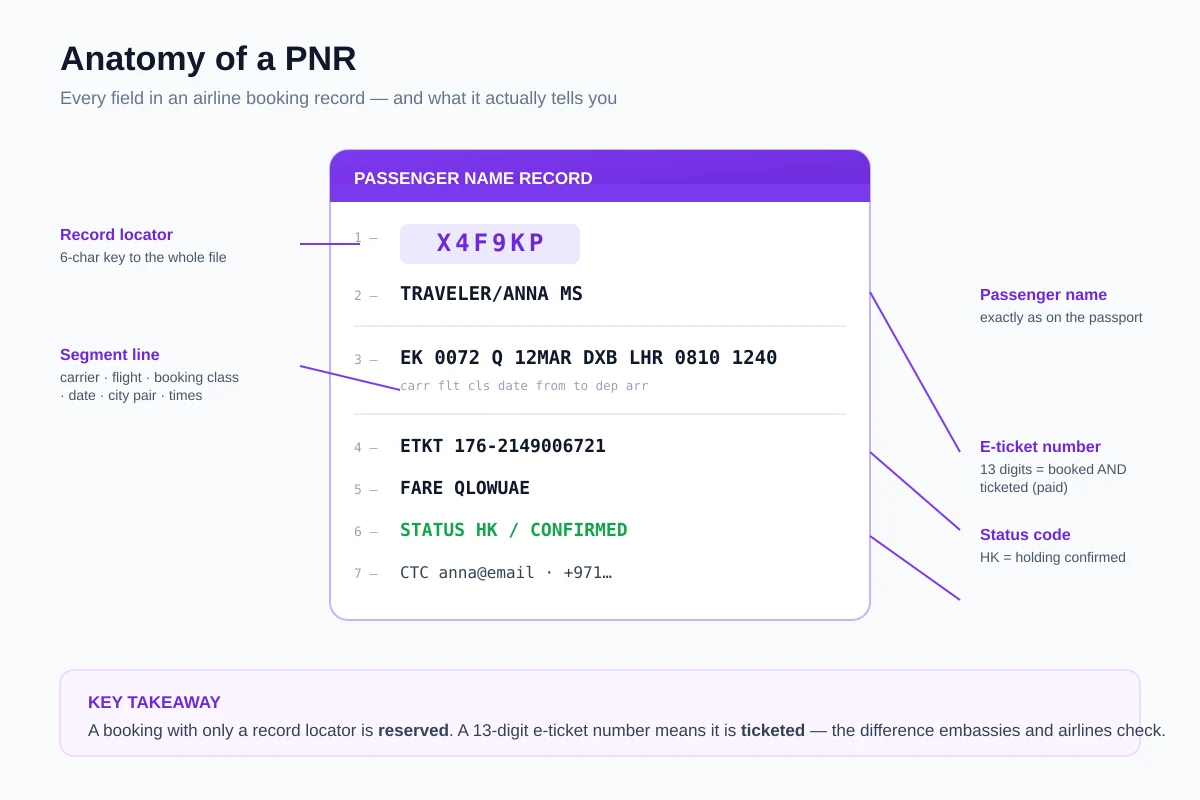
Reading top to bottom, a typical record contains:
- Record locator — the six-character retrieval key.
- Passenger name — surname first, then given name and title, matching the travel document.
- Segment line(s) — one row per flight: carrier, flight number, booking class, date, city pair and times.
- Ticketing element — the e-ticket number if the booking has been ticketed, or a ticketing time limit if it has not.
- Fare basis — a code that identifies the exact fare and its rules.
- Status code — for example HK (holding confirmed) or HL (waitlisted).
- Contact — the phone and email attached to the booking.
In our testing, the field travellers most often overlook is the ticketing element. A record can look complete, show confirmed segments and still carry no e-ticket number — which means it is reserved but never paid.
How to read a segment line
A segment line is the single most information-dense row in a PNR, and once you can read it the rest of the record falls into place. It packs the whole flight into a compact string: EK 0072 Q 12MAR DXB LHR 0810 1240. Reading left to right, that is the carrier, the flight number, the booking class, the date, the origin, the destination and the departure and arrival times.
The letter in the middle — Q in the example — is the booking class, also called the reservation booking designator. It is not the cabin. Economy alone is sold across a dozen or more letters (Y is usually full-fare economy; B, M, Q, T and others are progressively cheaper buckets with tighter rules), while J and C are business and F is first. The letter drives the price, the mileage earned and whether the fare can be changed or refunded.
Two travellers in the same economy cabin, on the same flight, can hold completely different booking classes — and that single letter, not the seat, decides what each paid and what each is allowed to change.
Key takeaway: the booking-class letter is the fare bucket, not the cabin. It is the quiet field that governs price and flexibility.
Which GDS issued your locator
A Global Distribution System (GDS) is the reservation backbone that airlines and agencies use to hold and exchange bookings, and the four big ones — Amadeus, Sabre, Travelport (Galileo/Apollo) and Worldspan — each shape the record locator a little differently. You cannot always be certain from the six characters alone, but the format leaves fingerprints. This is something no mainstream glossary page maps out, so we built it from the systems' own conventions.
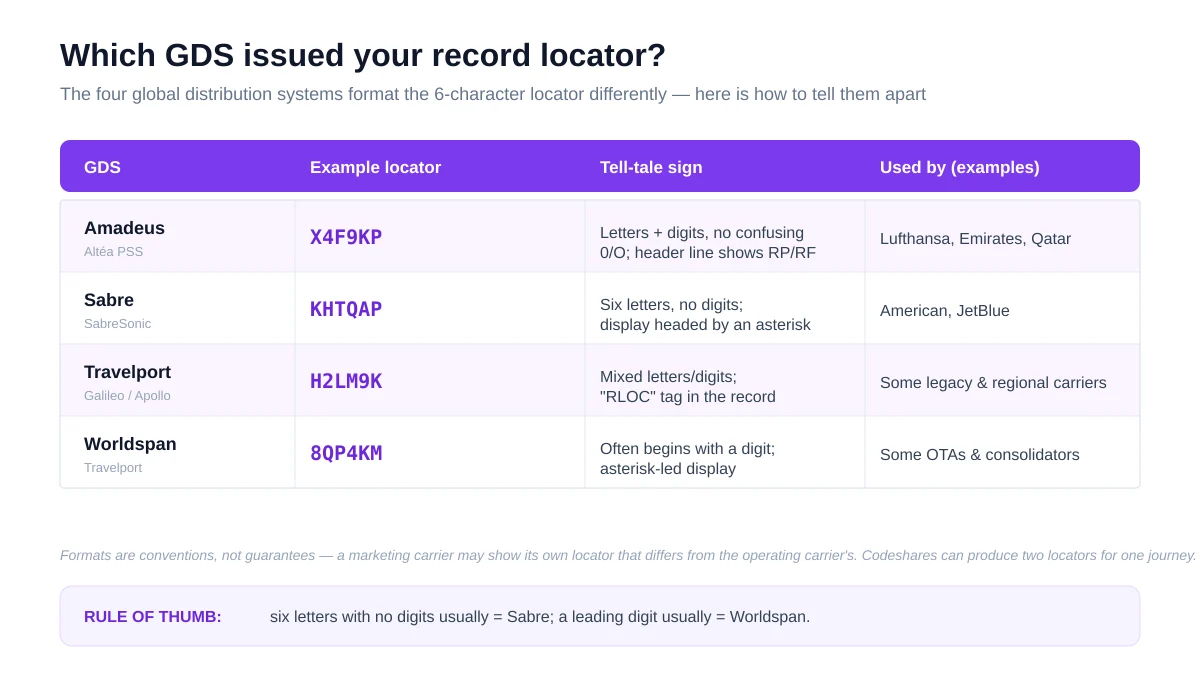
As a rule of thumb: six letters with no digits at all usually points to Sabre; a locator that begins with a digit often points to Worldspan; Amadeus deliberately avoids characters that are easy to misread. These are conventions, not laws — a marketing carrier on a codeshare can show its own locator that differs from the operating carrier's, which is exactly why one journey sometimes carries two record locators. We cover that split in our explainer on what your airline sends governments before you land.
Where to find your PNR
Your record locator appears on nearly every document the booking generates, usually labelled "Booking reference", "Confirmation code" or "PNR". The fastest place to find it is the confirmation email, where it is printed near the top; it is also on the boarding pass, the e-ticket receipt and inside the airline app under "My trips".
The one trap worth knowing: the six-character code on your boarding pass is sometimes the airline's own locator rather than the one the travel agency used to make the booking. If an airline's website cannot find your trip with the code from your agent, try the code printed on the ticket receipt instead — they can differ on agency and codeshare bookings.
- Open the booking confirmation email and look for "Booking reference" or "PNR".
- Check the boarding pass — the locator sits near your name.
- Open the airline app under "My trips" or "Manage booking".
- If none match, use the e-ticket receipt, which carries the ticketing locator.
Finding the code is only half the job. Once you have it, open the operating airline's site rather than the agency's, because the airline is the system that actually holds the flight. A locator that an agency shows you but the airline cannot retrieve is a sign the booking was never passed through to the carrier — a small check that takes thirty seconds and settles most doubts before they become a problem at the gate.
Booked vs ticketed: the difference that matters
Booked and ticketed are not the same state, and the gap between them is where most "my confirmed booking was cancelled" stories begin. A booked segment is a seat held in the PNR; a ticketed segment has an e-ticket number against it, which means a fare was filed and paid. Airlines routinely cancel held-but-unticketed segments when the ticketing time limit passes, and it happens silently.
This distinction is the heart of why a screenshot or a static PDF is weak evidence. A PDF can show confirmed-looking segments and a plausible locator and still correspond to nothing that was ever paid. The presence of a 13-digit e-ticket number, and a live record an airline system will still return, is what separates a genuine booking from a convincing image of one. We go deeper on timing and expiry in how long a flight reservation stays valid and when its PNR expires.
Our converter reads the segments, ticketing element and status straight from your PNR.
How to verify a PNR is real and live
Verifying a PNR means confirming that a live record exists behind the code, not just that a document looks right. The check that matters is independent retrieval: can the airline's own system find the booking using the record locator and the passenger surname? If yes, the record is live. If the airline returns nothing, the paperwork describes a booking that the airline does not hold — and that is precisely the check an embassy or a gate agent can run.
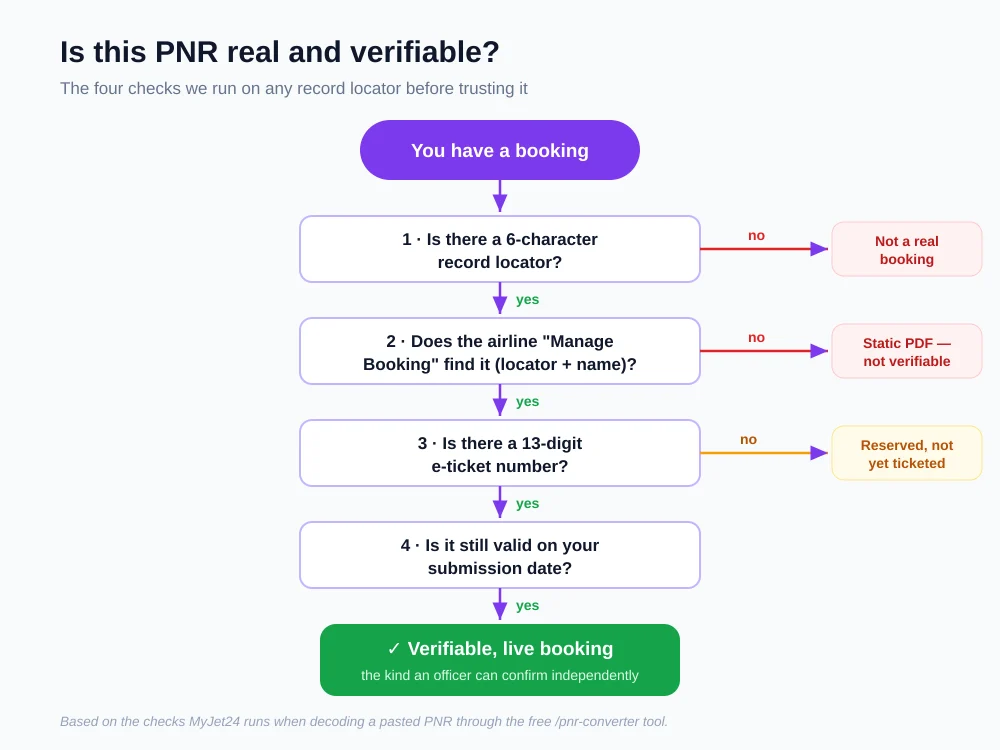
The sequence we use on any record locator is short:
- Locator present? No six-character code means there is no record to find.
- Manage Booking finds it? Enter the locator and surname on the operating airline's site. A live record returns the itinerary.
- E-ticket number present? A 13-digit number means it was ticketed, not merely held.
- Still valid on your date? Confirm the segments have not been cancelled and the dates cover the day you need.
This is the same logic behind our step-by-step on verifying a PNR before you submit it, and it is the reason airlines can enforce document rules through systems like Timatic, the database that decides whether you board.
What your PNR reveals — and who sees it
Your PNR is one of the most detailed commercial records that exists about a single trip, and it does not stay with the airline. Governments require carriers to hand over passenger data for border and security purposes, and the rules set out how long that data is kept. In the European Union, the PNR Directive governs the transfer and retention of booking data for flights, and separate advance passenger information is transmitted before departure.
The numbers on retention
The practical implication is simple: the booking you show at check-in is also the booking in the record that authorities can see. A genuine reservation exists in that data; a fabricated PDF does not. For the legal detail, the EU rules are set out in Directive (EU) 2016/681, the term itself is documented in the Passenger Name Record reference, and the equivalent US advance-data scheme is the Advance Passenger Information System (APIS) run by US Customs and Border Protection.
PNRs and proof of onward travel
For anyone dealing with visas or entry rules, the PNR is where proof of onward travel lives or dies. A request to show a return or onward flight is really a request for a verifiable booking — a record an officer can retrieve, not a picture of one. That is why the strongest proof is a real reservation carrying a live PNR, and the weakest is a static file that no system will confirm.
Understanding the record is the point: it tells you whether what you are about to submit is the kind of booking that survives a check. If you need a verifiable itinerary for an application, a genuine reservation with a live record locator is the safe route — and if you are weighing the document types, our comparison of dummy tickets, onward tickets and flight reservations and the six ways to show proof of onward travel lay out the trade-offs.
There is also a timing dimension officers rarely explain. A record locator retrieves a booking only while that booking is live, so a reservation that was valid last week can return nothing today if its ticketing limit lapsed or the held segments were released. When a consulate asks for proof dated close to your appointment, it is implicitly asking for a record that is still retrievable — not one that merely existed at some earlier point. Reading your own PNR is how you confirm the record still resolves on the day it needs to.
Next steps
You now know what a PNR is, how to read the codes inside it, how to tell which system issued it, and — most importantly — how to check that it is a live record rather than a convincing image. The single test worth remembering: a real booking is one an airline's own system will still return with your locator and surname.
The fastest way to see all of this on your own booking is to run it through the tool. Paste any confirmation or GDS block into our free converter and it decodes every field — segments, booking class, ticketing element and status — in plain English.
Sources
- European Union — Directive (EU) 2016/681 on the use of PNR data (five-year retention; depersonalisation by masking after six months).
- Passenger Name Record — record structure and IATA Resolution 830a minimum fields.
- Advance Passenger Information System — APIS, the CBP electronic passenger-data programme.
This guide explains airline Passenger Name Records as of 12 August 2026, drawing on IATA standards, Directive (EU) 2016/681 and US CBP material. Record-locator formats are industry conventions and can vary by carrier, agency and codeshare arrangement. Retention and data-sharing rules described are EU and US rules; other jurisdictions operate their own schemes with different terms. Verify booking status with the operating airline before you rely on it. This article is informational and not legal advice.
